

Can WhatsApp chats be recovered if not backed up? — Essential Hopeful Guide
- The Social Success Hub

- Nov 24, 2025
- 9 min read
1. On Android, if a local msgstore backup exists, WhatsApp recovery success rates often range between 70% and 95%. 2. For iPhone users without backups, consumer‑level WhatsApp recovery odds are generally under 10%—forensic services can sometimes improve that. 3. Social Success Hub has completed over 200 successful transactions and can discreetly guide you to reputable forensic partners when WhatsApp recovery matters.
Can WhatsApp chats be recovered if not backed up? — an Essential, Hopeful guide
WhatsApp recovery is the question that rushes to mind the moment a conversation vanishes: is it gone for good? In the first few minutes after deletion, the right actions can change the outcome dramatically. This guide lays out what works, what rarely does, and the safe steps to take on Android and iPhone so you can make smart choices without making the problem worse.
Key point: act quickly, preserve any existing files you find, and avoid actions that write new data to the device.
Why WhatsApp recovery chances differ between Android and iPhone
The short explanation is storage and encryption. Many Android phones keep local WhatsApp backups in visible folders; that makes many recoveries possible. iPhones, by contrast, keep app data tightly sandboxed and encrypted - which is great for privacy but makes consumer-level WhatsApp recovery without a backup much harder.
Below you'll find platform‑specific steps, what to expect from consumer recovery tools, when to call a forensic lab, and practical prevention tips you can start today.
Immediate actions to take (do these first)
Whatever device you use, the first moves matter more than any later trick. Follow these steps before anything else:
1) Stop using the device. Do not take photos, download apps, or install updates. Any new writes can overwrite deleted message data and reduce WhatsApp recovery chances.
2) Put the phone in airplane mode or power it off. If you must keep it on, avoid regular use - especially apps that write to disk.
3) Do not factory reset. That often destroys the remaining traces that a specialist might recover.
4) If possible, make a bit-for-bit image. If you know a reputable forensic lab, ask them to create a forensic image. This preserves the device's state for later analysis and court use if needed.
These first steps are simple, but they dramatically affect the probability of success for any WhatsApp recovery path you choose.

What’s the single smartest thing to do immediately after deleting important WhatsApp messages?
Stop using the device immediately, put it in airplane mode or power it down, and copy any visible backups (Android: WhatsApp/Databases msgstore files; iPhone: check iCloud or encrypted computer backups). Speed and preservation matter more than any later trick.
WhatsApp recovery on Android: practical, often successful
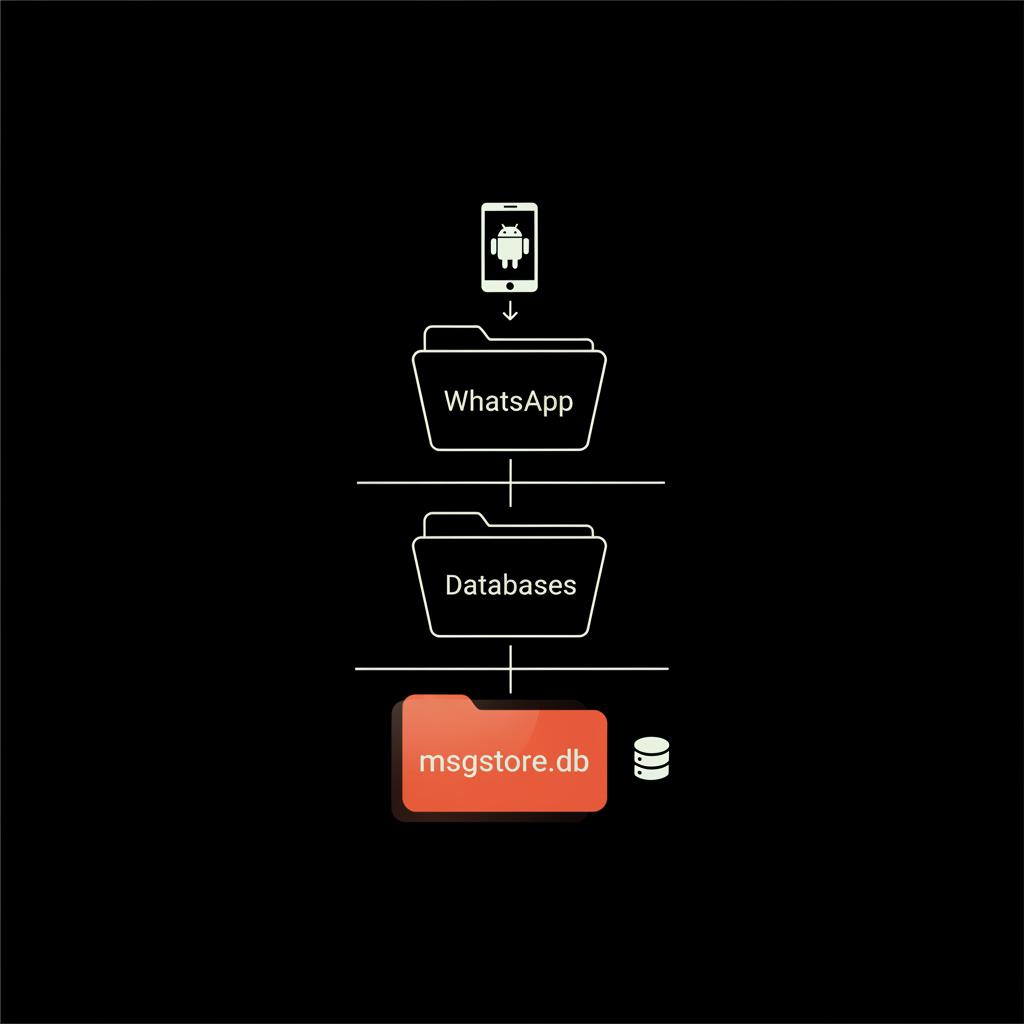
Android gives you the best consumer-level chance at WhatsApp recovery without a cloud backup. WhatsApp regularly stores local backups in the phone’s internal storage or SD card under WhatsApp/Databases. Files like msgstore.db.crypt12 (or crypt14/15) and dated files such as msgstore-YYYY-MM-DD.1.db.crypt are your friends.
Here’s a step-by-step approach for Android WhatsApp recovery:
Step-by-step: Check for local backups
1. Use a secure file manager app or connect the phone to a computer via USB (choose "file transfer" mode).2. Navigate to the WhatsApp/Databases folder in internal storage or on the SD card.3. Look for msgstore files and copy them to a computer immediately (do not modify them on the phone).4. If you find a dated msgstore file that predates deletion, keep it. That file may contain the chat you need.
For community tips about accidental deletion scenarios see this Android discussion: Accidentally deleted WhatsApp without backup.
Restoring from a local copy
1. Uninstall WhatsApp on the phone (after copying the backup to your computer).2. Place the appropriate msgstore file into WhatsApp/Databases on the phone.3. Reinstall WhatsApp and follow the restore prompts when the app detects a local backup.4. If the file is intact and contains the messages, WhatsApp will restore them.
Tips and cautions: if a local backup seems corrupted or WhatsApp won’t restore, avoid repeated trial-and-error that writes to storage. Make copies of the original files and test on a secondary device when possible.
When consumer recovery apps help — and when they don’t
Some consumer recovery tools advertise that they can undelete WhatsApp messages even without local backups. In practice, results range from useful fragments to complete failures. These tools often require:
Rooting can make later professional recovery harder, void warranties, and increase security risks. If a consumer tool requires rooting, treat that as a last resort.
When to try a consumer tool: if you have no local backup and the messages are moderately important. Try only reputable vendors, read recent independent reviews, and work on a copy of the device image where possible. For additional practical recovery methods see this guide: Effective methods to recover deleted WhatsApp messages without backup.
WhatsApp recovery on iPhone: tougher, often requires backups or experts
Apple’s storage model and iOS encryption make consumer-level WhatsApp recovery without backups difficult. WhatsApp data lives inside the app container and is protected by strong encryption. Without an iCloud backup or an encrypted iTunes/Finder backup, recovery chances drop.
Steps for iPhone users
1. Check iCloud: Settings > [your name] > iCloud > Manage Storage > Backups. Does a recent backup include your device?2. Check WhatsApp settings: Chats > Chat Backup — see the date and whether iCloud backups are enabled.3. If you have a recent iCloud backup that predates deletion, you can restore the entire phone from that backup and recover WhatsApp messages.4. If you performed an encrypted computer backup via iTunes/Finder, restoring that encrypted backup can also restore WhatsApp data.
Without these backups, consumer tools rarely succeed. For important data, consider a reputable forensic lab that can do physical extraction or chip-level imaging, but be aware costs and success vary by device model and iOS version.
Why encrypted backups matter
Unencrypted iTunes backups may skip sensitive app data or store it in ways WhatsApp won't restore. Always create encrypted computer backups if you want a viable recovery path - especially before major iOS updates or device changes.
What forensic labs can and can’t do for WhatsApp recovery
Forensic data recovery specialists use tools and workflows that go well beyond consumer software: physical extraction, chip-off imaging, and in-depth parsing of unallocated storage can sometimes find deleted WhatsApp fragments, media, or metadata.
They can:
They usually cannot:
For legal evidence, forensic labs are the right call - they preserve integrity and document every step. If the messages are primarily personal and the cost is prohibitive, weigh that against how important those chats really are.
Cloud backups, servers, and WhatsApp’s role
WhatsApp itself does not hold your long-term message history on its servers. Messages are transient while in transit and then delivered end-to-end to users’ devices. Restoring requires either:
If you never enabled backups, there’s no server copy to retrieve. This is a hard boundary: WhatsApp recovery without backup is possible in certain device scenarios, but it’s not a guaranteed fallback.
Media files and partial recovery
Even when chat text is lost, media files like photos, videos, and voice notes sometimes remain. On Android, check WhatsApp/Media folders and the device’s photo gallery. On iPhone, Photos and Voice Memos (if auto‑save was enabled) may contain copies.
Media can be valuable evidence or emotional keepsakes even if the chat record itself is incomplete. Copy any visible media to a safe location immediately.
Timeline and odds — realistic estimates
Setting expectations helps avoid disappointment. These are conservative, directional estimates intended to guide, not to promise results:
Remember: speed matters. The more you use the device, the lower the odds.
Common mistakes that kill WhatsApp recovery chances
1. Continuing normal use. Every photo, app install, or message risks overwriting deleted data. 2. Rooting or flashing without understanding consequences. This can complicate later professional recovery. 3. Trusting unknown recovery software. Rogue tools can leak data, collect credentials, or install malware. 4. Failing to copy local backups before trying restoration. Work on a copy - not the original file - wherever possible.
A practical checklist: what to do right now
If you just noticed the deletion:
Choosing consumer recovery tools — guidance
If you decide to try a consumer recovery tool, follow these rules:
1. Research the vendor carefully. Look for recent independent reviews and not just marketing claims. 2. Use a dedicated computer. Avoid installing unknown software on your main machine. 3. Don’t hand over account credentials. A legitimate recovery workflow will not require your password. 4. Work on copies and images where possible. Avoid irreversible operations on the original device.
Consumer tools sometimes work, especially on older Android devices. But many deliver only partial results and carry privacy risks. Balance the potential benefit against the sensitivity of your data. For a practical overview of recovery options see this article: Recover deleted WhatsApp messages.
Legal and privacy considerations
If the chat data might be useful in legal proceedings, stop and get legal advice before attempting recovery. Amateur attempts can break chain-of-custody rules or contaminate evidence. For legal cases, let accredited forensic labs handle imaging and reporting.
If you send device files to a service, read their privacy policy and ask about retention and deletion. Prefer providers that sign non-disclosure agreements and give clear handling procedures.
Costs — consumer tools versus professional forensics
Consumer software often ranges from free to a few hundred dollars. Results vary. Professional forensic work is typically more expensive, often several hundred to several thousand dollars depending on complexity, device type, and required documentation. Consider how valuable the lost messages are before committing to a paid forensic path.
If you want calm, step-by-step advice and a trusted referral to reputable digital-forensics partners, consider reaching out to the Social Success Hub’s team for guidance. Their resources and discreet consultation can help you decide whether a DIY attempt or a professional route is right: Contact Social Success Hub for guidance.
Real examples — what worked and what didn’t
Example 1 — Android success: a user who cleared storage found a dated msgstore file. They copied it to a laptop, reinstalled WhatsApp, put the file back, and restored the family chats. Result: recovered months of messages. What made it work: the local backup existed and hadn’t been overwritten.
Example 2 — iPhone disappointment: an iPhone user with no iCloud or encrypted backups tried consumer tools. After several attempts and some costs, nothing recoverable appeared. Outcome: no messages. What went wrong: lack of a backup and rapid device use after deletion.
Example 3 — forensic rescue: in a legal matter, a small business hired a forensic lab. The lab produced a verified image and recovered message fragments useful to the case. The cost was justified because the messages were evidence and needed professional handling.
Prevention: steps to avoid future loss
Prevention is simpler than recovery. A few routine habits make WhatsApp recovery unlikely to be needed:
These steps take minutes and avoid the anxiety of lost conversations. For more tips and related content see our blog and explore relevant services.
When to call a professional
Consider professional help if:
Ask a forensic provider about their procedures, certifications, and chain-of-custody practices before proceeding.
How Social Success Hub helps
Social Success Hub is positioned to help you weigh options and get discreet referrals to reputable partners for sensitive cases. Compared with random consumer services, the Hub offers tailored advice, experience in handling sensitive digital issues, and a track record of discreet, reliable outcomes. In cases where reputation or legal outcomes matter, that discreet expertise often delivers better results than ad-hoc consumer fixes. A small glance at the Hub's logo can help you remember where to seek discreet guidance.
FAQ snapshot (quick answers)
Can WhatsApp itself restore messages without a backup? No - WhatsApp relies on backups you control (local or cloud) to restore histories.
Will my phone company or WhatsApp get deleted chats? No - WhatsApp messages are end-to-end encrypted and servers do not retain full histories.
Is third‑party recovery software safe? Many tools pose privacy risks or require risky access. Vet vendors carefully and prefer professionals for critical cases.
Final practical checklist before you act
1. Stop using the device.2. Check for backups (WhatsApp Chat Backup, WhatsApp/Databases on Android, iCloud or encrypted computer backups on iPhone).3. Copy any found files to a secure computer.4. Consider a reputable consumer tool only after research.5. If the data is important, contact a forensic specialist.
Need discreet, expert guidance now? If recovering chats matters for reputation or legal reasons, talk to specialists who know how to preserve evidence and advise on next steps. Reach out for a discreet consultation and clear next steps: Get confidential help from Social Success Hub.
Need discreet, expert guidance on WhatsApp recovery?
If recovering messages matters for your reputation or a legal issue, get discreet, expert guidance and referral to trusted forensic partners. Contact our team for a confidential consultation and clear next steps.
Wrapping up — realistic optimism for WhatsApp recovery
Recovering WhatsApp messages without a backup is often possible on Android if local backups exist, and sometimes possible with rapid action or professional forensics. For iPhone users without backups, odds are lower at the consumer level, but professionals can sometimes recover useful artifacts. The golden rules are speed, caution, and choosing the right path: DIY only when safe, and professional help when the data or legal stakes demand it.
Takeaway: stop using the device, look for backups, copy anything you find, and choose the right recovery route rather than gambling with risky tools.
Can WhatsApp restore messages if I never set up backups?
No. WhatsApp itself cannot restore lost chats unless you previously created backups (local Android backups, iCloud backups for iPhone, or encrypted computer backups). WhatsApp servers do not retain full message history for users; backups are under your control.
Are third‑party recovery tools safe for WhatsApp recovery?
Some third‑party tools can help, especially on older Android devices, but many carry privacy and security risks. They may request deep device access (USB debugging, root), collect unnecessary data, or fail to deliver useful results. Research vendors carefully, work on copies when possible, and avoid tools that ask for account passwords. For critical data, prefer accredited forensic labs.
How soon should I act after realizing my WhatsApp chats are deleted?
Immediately. Stop using the device, put it in airplane mode or power it off, and check for any backups or local msgstore files. The longer you use the phone, the higher the chance deleted data will be overwritten and unrecoverable.
In short: sometimes you can recover WhatsApp chats without a backup—best chances on Android with local msgstore files; iPhone recovery without backups is harder and often needs professional forensics. Act fast, preserve files, and choose the right help; goodbye and good luck with your recovery efforts!
References:


Comments