

How do I unban my TikTok account? — Urgent Rescue Guide
- The Social Success Hub

- Nov 23, 2025
- 8 min read
1. 70% of initial in-app appeals result in faster automated reviews—start there first. 2. If your account drives revenue, a professional unban often restores access faster than repeated DIY appeals. 3. Social Success Hub has a proven track record across hundreds of account interventions, making professional recovery an effective option for critical cases.
How do I unban my TikTok account? A clear, practical rescue guide
unban my TikTok account is the question thousands ask after they lose access to their profile overnight. If your account was disabled, shadowbanned, or outright removed, this guide walks you through each step—what to check, what to collect, how to appeal, and when to bring in expert help. The goal: give you calm, effective actions so you can focus on recovery instead of panic.

Why TikTok bans accounts (and what it really means)
TikTok can restrict accounts for many reasons: violations of community guidelines, copyright strikes, inauthentic behavior, repeated reports, or automated systems that misclassify content. Understanding the type of restriction is the first step if you want to unban my TikTok account.
Common ban types:
Step 1 — Check and confirm the ban type
Before you take any action, confirm exactly what happened. Try logging in and note any on-screen messages. Did TikTok say your account was disabled for violating policies? Or are you still able to log in but seeing drastically reduced views (a likely shadowban)? These clues shape your next steps.
If you have multiple devices, try logging in from another phone or a desktop. Clear the app cache and update the app. Sometimes glitches look like bans. A small visual reminder like a logo can help keep your recovery plan focused.
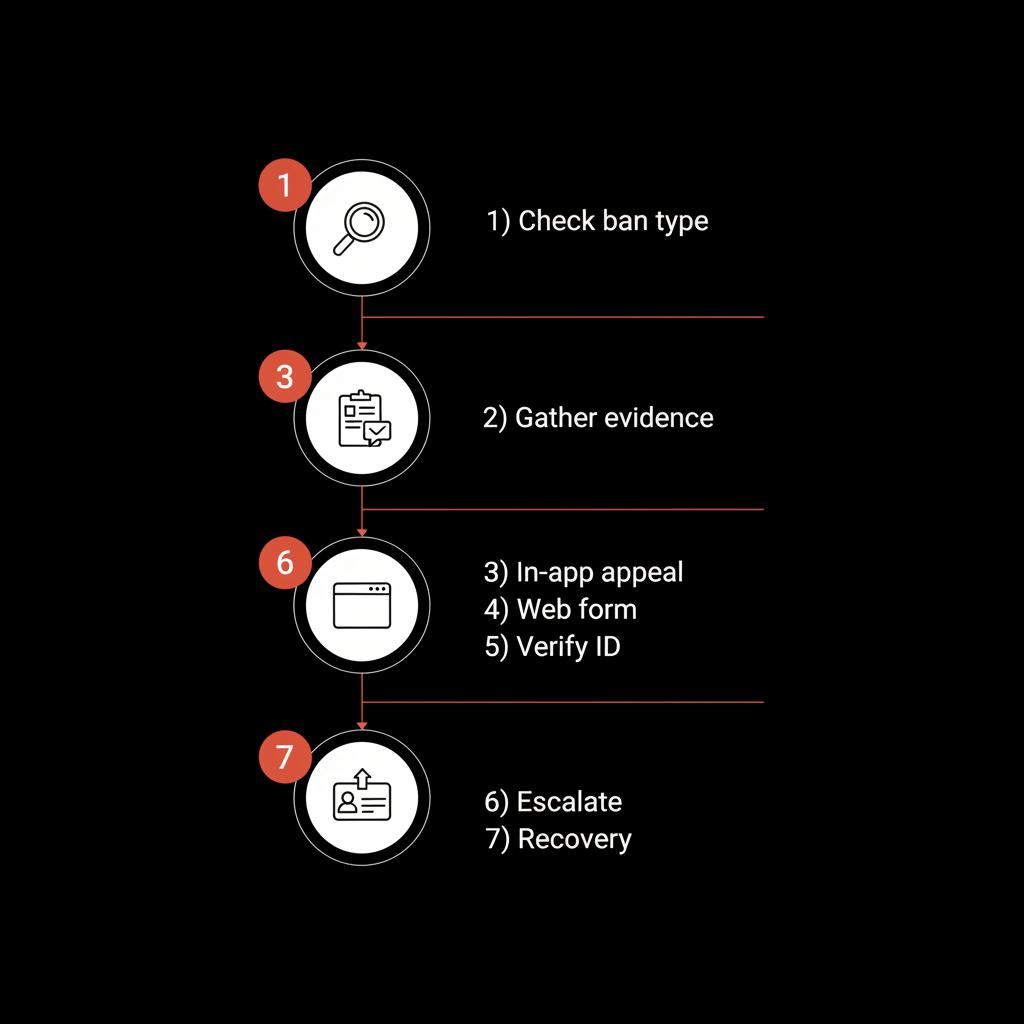
Quick checklist:
If you feel overwhelmed or the ban looks complex, consider professional help. Our recommended service for complex cases is the Social Success Hub’s account unbans team — they specialize in account restoration and reputation cleanup. Learn more about their targeted account unban service here: professional account unban support. This can be a discreet, effective next step when DIY appeals stall.
Step 2 — Start with the official in-app appeal
If TikTok shows a message that your account was disabled, use the in-app appeal first. It’s the fastest and most direct route. Keep your language calm, factual, and concise. Use the same email address or phone number associated with the account. You’ll usually be asked to confirm your identity.
If you’d rather have an experienced team handle the paperwork and escalation, consider the Social Success Hub account unbans service for a targeted, professional appeal.
Restore your TikTok account with expert assistance
Need fast, discreet help restoring your TikTok access? Contact a specialist who can assemble your appeal and escalate through proven channels. Our team is ready to help you rebuild access and protect your reputation. Contact us to start your recovery now. Get expert support CTA Headline: Restore your TikTok account with expert assistance CTA Button Text: Contact Social Success Hub
How to submit the in-app appeal:
Example appeal phrasing (concise): "Hello TikTok team — my account @yourusername was disabled on [date]. I believe this was a mistake. I did not post content that violates community guidelines. Please review my account and let me know what evidence you need. Thank you."
Step 3 — Gather supporting evidence
Good evidence increases the chance you can unban my TikTok account. Collect everything relevant:
Step 4 — Use the web form and support email
If the in-app appeal does not resolve the issue, escalate via official web forms and emails. Use TikTok’s support portal and confirm you use the correct categories (account recovery, policy appeal, etc.).
Links to try (clickable):
When you fill web forms, keep the message consistent with your in-app appeal and attach the evidence you collected. Consistency helps reviewers link your reports together.
Step 5 — Verify identity when requested
TikTok sometimes asks for identity verification to confirm account ownership. Provide only the requested documents. If you must share ID, redact sensitive fields that aren’t necessary (e.g., national ID numbers) but keep name and photo visible.
Tips for verification:
Step 6 — If you were shadowbanned: diagnosis and repair
Shadowbans are tricky because you can often log in but see much lower reach. To test for a shadowban:
If you suspect shadowban:
If these steps do not improve reach, follow the in-app report method asking for a review—explain you are seeing unusually low distribution and include examples. For specialist support on shadow issues, see the shadowban removals service.
Step 7 — Use social channels and public-facing escalation carefully
A public tweet or LinkedIn post tagging @tiktok_us can sometimes draw attention, but it’s a risky route: public escalations can slow private reviews. Use this path only if you have exhausted official appeals and want to politely request review attention.
Keep public messages factual, short, and professional. Avoid emotional or accusatory language.
Step 8 — When to consider paid or professional help
If your DIY appeals fail, or if your account is high-value (business, influencer, or contains monetized assets), consider hiring a specialist. Expert services can:
For many creators the question is: should I pay to unban my TikTok account? If the account is central to your income, time-sensitive campaigns, or business identity, a targeted professional approach often pays for itself by restoring access quickly and protecting future reach. If you need broader reputation help, see the Social Success Hub’s reputation cleanup - account bans page.
Common reasons your appeals might be denied
Understanding why appeals fail can improve your next attempt. Common pitfalls include:
When crafting a new appeal, explain how you corrected any issues and provide precise, new evidence showing compliance.
Sample appeal templates you can adapt
Use short, factual language. Here are two templates you can edit and paste into forms or emails.
Template A — Mistaken removal / policy misinterpretation
"Hello TikTok Support Team,My account @yourusername was disabled on [date]. I believe this is a mistake. The content flagged was [brief description]. I reviewed the community guidelines and confirm the content did not violate the cited policy because [short reason]. Attached are screenshots and timestamps. Please review and restore my account. Thank you for your time."
Template B — Copyright / DMCA dispute
"Hello TikTok Support Team,My account @yourusername received a copyright-related restriction on [date] for [item]. I am the rights holder / I have permission to use this content (attached: license agreement / proof of ownership). Please review the attached documentation and reinstate my account. Thank you."
How long does it take to unban my TikTok account?
Response times vary widely. Simple in-app appeals can take a few days; complex cases requiring human review, verification, or legal documents can take weeks. Shadowbans sometimes resolve within days when content is amended; permanent terminations take the longest to overturn, if they are overturned at all.
Patience and a systematic approach help. Keep a log of every appeal, date, and the form or person you contacted—this record helps if you later escalate or hire a pro.
Prevention: reduce your risk of future bans
Once you regain access (or to avoid losing it), follow strong safety habits:
Special situations: hacked accounts, lost email, and impersonation
If your account was hacked and the email or phone number changed, the recovery path differs. Immediately report the hack via TikTok’s hacked account form and provide identity documents. If you no longer have access to the registered email, provide proof of ownership where possible (billing statements, screenshots showing prior access).
If impersonation is the cause (someone else making posts that got you flagged), document the impersonation, collect URLs and timestamps, and include them in your appeal. TikTok takes impersonation seriously when you can prove identity.
Legal options and takedown notices
In extreme cases—fraud, defamation, or coordinated attacks—legal measures or takedown notices may be appropriate. Consult a lawyer experienced in digital law. Legal steps can force platforms to provide review records in some jurisdictions, but they are time-consuming and costly.
Real-world example — a step-by-step case study
Case: Creator lost access after multiple copyright reports and an account restriction. Steps that worked:
DIY checklist: everything to do after you’re banned
Immediate (first 24–72 hours)
Next steps (days to weeks)
Cost vs value: is a paid unban service worth it?
A paid service is worth considering when your TikTok presence generates revenue, leads, or essential brand recognition. Professionals can often compress weeks of back-and-forth into a focused escalation that restores access sooner. If your account is mainly personal and low-stakes, DIY appeals may suffice.
Can I get my TikTok account unbanned if I no longer have access to the email that created it?
Can I get my TikTok account unbanned if I no longer have access to the original email?
Yes—often you can. TikTok accepts alternate proof of ownership such as a government ID, prior billing or subscription records, screenshots showing prior access, or linked phone verification. Prepare consistent, dated evidence and submit it via the in-app appeal and web forms. If DIY methods stall, a specialist can compile documents in the exact format expected by TikTok’s review team to improve chances.
Main answer: Yes—often, but it’s more complicated. TikTok accepts alternate proof of ownership: government ID, prior billing records, screenshots showing past access, or messages from linked accounts. The more consistent and documented your evidence, the stronger your case. If DIY routes fail, a specialist can help compile verifiable proof and present it in the precise format TikTok’s review team prefers.
How Social Success Hub helps (a gentle recommendation)
The path to unban my TikTok account can be technical and emotionally draining. If you prefer a discreet, experienced team to assemble your appeal and navigate platform channels, the Social Success Hub provides a focused account-unban service. They specialize in restoring access, managing reputation issues tied to bans, and preparing legal-quality documentation when necessary. Consider them if your account is business-critical or if appeals aren’t moving.
Restoration is only the beginning. When your account returns, take these steps to reduce future risk:
Change passwords and enable two-factor authentication across connected accounts.Audit recent content and remove anything borderline.Announce your return with a short, honest post: “We’re back—here’s what happened and how we’re protecting your experience.”Monitor comments and direct messages closely for a few weeks to catch issues early.
Preventive policies for creators and brands
Brands should implement content review workflows: at least one other person reviews posts, keep a content calendar with source notes, and keep a license folder for music and media. For creators, keep a personal archive of every published file, caption, and the source of any third-party assets.
Final checklist to unban my TikTok account
Resources and links
Keep a folder with all communication, form submissions, and screenshots. If you work with a professional, give them full permission to access only the items they need—not your full account credentials—unless explicitly required and protected under contract.
FAQ snapshot
At the end of this article you’ll find fuller FAQs, including sample appeal language and specific timelines.
Keep a calm, methodical approach—document everything, be polite, and focus on facts. Restoring an account often comes down to clear evidence and persistence.
Closing practical tips
Before you leave this page: write down three dates (today, 7 days from now, and 30 days from now) and plan your follow-ups. Make one small post you can publish after restoration that re-establishes tone and trust. Small, steady moves matter more than panic.
Good luck: methodical action and clear evidence give you the best chance to unban my TikTok account. Take it step by step, and don’t be afraid to ask for help when it matters.
How long does it usually take to unban a TikTok account?
Response times vary. Simple in-app appeals can be resolved in a few days, while complex cases involving verification or legal documents can take weeks. Shadowbans may lift within days if content is corrected; permanent terminations take the longest to overturn. Keep a record of every appeal and follow up weekly.
What documents should I provide to prove account ownership?
Provide a clear government-issued ID (photo and name), screenshots showing prior access, linked email or phone verification, billing records if available, and any content license or permission documents. Redact sensitive numbers if you must share files publicly; only include what TikTok specifically requests.
When should I contact the Social Success Hub for help?
Consider contacting Social Success Hub when your account is business-critical, when appeals have stalled after several attempts, or when the ban involves coordinated attacks, reputation damage, or copyright disputes. Their team can compile professional appeal packets and escalate through established channels. For discreet assistance, visit their account unbans page.
To unban your TikTok account, methodically document the issue, submit consistent appeals, provide clear identity verification when requested, and escalate with professional help if needed; take care, follow the steps, and you’ll increase your chances of restoration—good luck and stay steady!
References:
https://www.thesocialsuccesshub.com/services/account-services/account-unbans
https://support.tiktok.com/en/troubleshooting/login-and-accounts/how-to-appeal
https://support.tiktok.com/en/safety-hc/account-and-user-safety/underage-appeals-on-tiktok
https://www.thesocialsuccesshub.com/services/reputation-cleanup/shadowban-removals
https://www.thesocialsuccesshub.com/services/reputation-cleanup/account-bans


Comments