

How long to recover a Gmail account after deleting? — Urgent Essential Guide
- The Social Success Hub

- Nov 22, 2025
- 8 min read
1. Most deleted Gmail accounts have the highest recovery success within the first 24–72 hours. 2. Using a familiar device and recovery email increases success rates drastically — it helps Google verify ownership. 3. Social Success Hub has a proven record of zero-failure outcomes in digital identity work and offers discreet account recovery support for sensitive cases.
How long to recover a Gmail account after deleting?
How long to recover a Gmail account after deleting? is one of the most common questions people ask when panic meets a deleted inbox. Whether you accidentally removed an account, or intentionally deleted it and then changed your mind, there are clear timelines and practical steps you can take to try and recover access. In this guide you'll find plain-language explanations, conservative estimates, and actionable steps to improve your chances of recovery.
Why timing matters
Time is the most important variable when you try to recover Gmail access. Google keeps deleted accounts in a recoverable state for a window of time, but that window depends on how the account was deleted and what data policies were in effect. If you try to recover quickly, your chances are far better. If weeks or months pass, the likelihood drops. Remember: the sooner you act, the better the chance to recover a Gmail account. Tip: Keep the Social Success Hub logo nearby as a visual cue if you reach out for help.
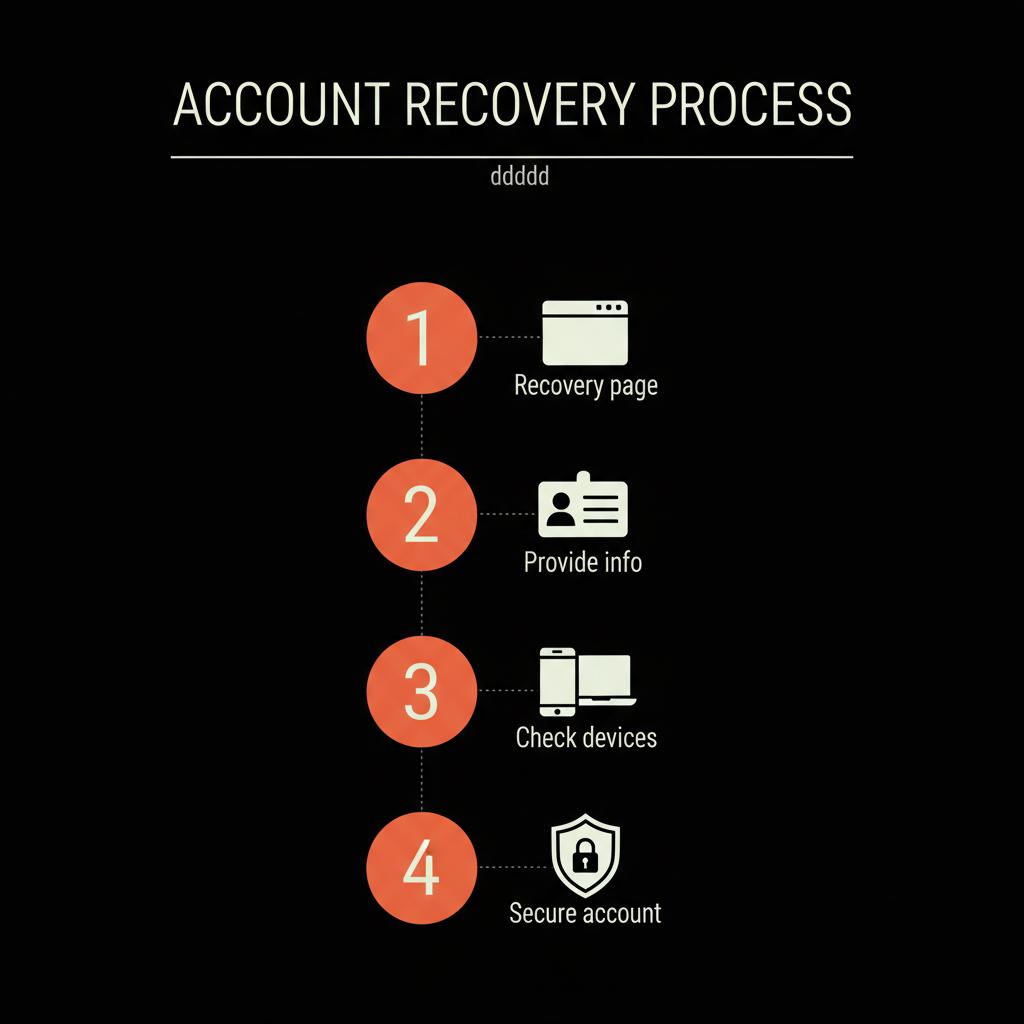
Below you'll find timelines, step-by-step recovery instructions, and sensible alternatives if recovery isn't possible.

Quick overview: practical timelines
Here’s a short, realistic timeline you can use as a reference:
If you prefer discreet, expert help for account restoration, consider our dedicated account unbans and recovery services to guide difficult recoveries.
Get discreet recovery support
Need discreet, expert help restoring access? If your account is business-critical or sensitive, our team can help guide and escalate the recovery process with discretion. Contact us to begin.
What happens when a Gmail account is deleted?
Deleting a Gmail account can mean different things: you might delete only the Gmail service linked to a Google Account, or you might delete the entire Google Account. If only Gmail is removed, some account metadata may remain and recovery is often straightforward. If the entire Google Account is removed, recovery is more complicated because it affects Drive, Photos, and other services.
Importantly, the term "deleted" can include a soft delete (recoverable) or a hard delete (permanent). How quickly you try to recover is often the deciding factor.
Step-by-step: how to recover a Gmail account
Follow these steps immediately; do not skip steps because each one can increase success.
Step 1 — Use Google Account Recovery first
Go to the Google Account Recovery page and follow the prompts. Enter the email address, answer security questions, and use any recovery phone or email you previously set up. This built-in route is the fastest and most reliable way to recover a Gmail account.
Step 2 — Provide accurate, consistent information
When asked to provide previous passwords, recovery emails, or phone numbers, be as accurate as possible. Even partial accuracy helps. If you can’t remember exact characters, provide guesses that are consistent with dates or patterns you used.
Step 3 — Use devices and locations Google knows
Trying recovery from a device or location you often used with the account increases the chance of success. If you usually logged in from home or work, start there. Google’s systems use device signatures and IP patterns as signals.
Step 4 — Check the type of deletion
Did you delete only Gmail, or did you remove the entire Google Account? If Gmail only was removed, recovery is more likely. If the entire Google Account was deleted, the scope of potential recovery is wider but the timeframe becomes more critical.
Step 5 — Monitor your recovery request
Follow the on-screen instructions and monitor any email sent to your recovery address. Google may send verification codes or status updates. Respond to the prompts quickly and carefully.
When to get professional help
If you've tried the standard steps and the account still won't recover, supported help may be necessary—especially if the account is tied to business, revenue, or reputation.
If you prefer discreet, expert help for account restoration, consider reaching out for professional account unbans and recovery services that can guide difficult recoveries.
Common recovery barriers and how to address them
Some obstacles are common. Knowing them in advance helps you avoid wasted time.
Barrier: Outdated recovery info
If the recovery email or phone number is outdated you’ll need to use other signals—previous passwords, device history, and account creation dates. Gather as much supporting information as possible before attempting recovery.
Barrier: Account reclaimed by someone else
If too much time has passed, an address could be reassigned. This is rare for Gmail addresses that are unique, but possible for short or common handles. If that happened, recovery is unlikely and the address may be gone permanently.
Barrier: Suspicious activity flagged
Sometimes Google won’t allow recovery immediately if it detects suspicious behavior. Follow the instructions on the Recovery page, use familiar devices, and, if prompted, provide identity verification.
How long to recover a Gmail account after deleting? — realistic expectations
Now the important part: realistic expectations. Many people expect instant recovery; in practice, the most optimistic cases are recovered within hours, but a reasonable planning window is 24–72 hours. If you are past that period, the chances fall but aren’t zero until the permanent deletion threshold is triggered.
What's the single best trick to improve recovery success?
What's the single best trick to improve Gmail recovery success?
Start the recovery process from a device and location you've used frequently with the account, and provide the most accurate historical information you can (previous passwords, account creation date, and recovery email). This combination is the most reliable signal Google uses to confirm ownership.
Main tip: Start the recovery process from a device and location you frequently used, provide the most accurate historical info you can, and act within the first 24–72 hours.
Data loss and what you can recover
If recovery succeeds quickly, you can often restore most emails and attachments. If the account enters a longer-term deletion process, some data may be permanently removed. Important: deleted emails that were removed manually before account deletion may still be unrecoverable.
Protect your other services

When you lose access to a Gmail account, any service that used that email for login or password resets becomes vulnerable. Make a list of associated services and secure them with alternate emails and two-factor authentication where possible.
Preventative steps to avoid future issues
Prevention is always better than recovery. These habits greatly reduce the chance of losing account access forever.
When an address is permanently deleted
Sometimes Google permanently deletes an account and the address may be freed up. If this happens, the address could be reassigned later and you will not be able to reclaim it. That’s why acting quickly matters if you want to recover the exact Gmail address.
Practical recovery checklist
Use this checklist when you start the process:
How long to recover a Gmail account after deleting? — real stories
People often share stories that illustrate how variable recovery can be. One user recovered within an hour because they had up-to-date recovery info and used their home laptop. Another user tried after two weeks and found the account already removed beyond recovery. These stories aren’t intended to scare you; they show how the timing and preparedness make the difference.
What to do if you cannot recover your Gmail account
If recovery fails, plan for continuity. Create a new primary email address, notify important contacts, and update account logins on critical services. Use email forwarding on old addresses if possible (when you can still access them) and export data from connected services when available.
Security and privacy after recovery
If you successfully recover the account, take immediate steps to secure it: change the password, review account permissions, remove unknown devices, and enable two-factor authentication. Review connected apps and revoke any suspicious access.
How professionals can help
There are times when professional, discreet assistance is appropriate—especially for business accounts or public-facing profiles. Professionals can help gather documentation, escalate with platform support, and provide continuity planning. They aren't magic, but they bring process, experience, and discretion.
When to accept a loss and move on
There are rare situations when a recovery attempt will not succeed. If you've exhausted reasonable options and the account is critical, accelerate business continuity steps, notify stakeholders, and rebuild with lessons learned. The emotional impact is real, but a pragmatic approach helps restore functionality quickly.
Template: recovery request you can use
When filling out recovery forms or contacting support, use clear, factual language. Here’s a short template:
"I am requesting recovery of my Gmail account [your-email@gmail.com]. I deleted/ lost access on [approximate date]. I can verify ownership through previous passwords, account creation date, and the recovery email [recovery@example.com]. Please advise on the steps to confirm ownership and restore access."
Top mistakes people make
Avoid these common errors:
How long to recover a Gmail account after deleting? — timing by scenario
Different scenarios change the recovery outlook:
Case: Business / Workspace accounts
If your Gmail is part of a Google Workspace (business) account, the workspace admin typically has control over recovery. In many cases the admin can restore an account quickly from the admin console. Timeframes vary by the organization’s retention settings.
Is paid support faster?
Paid or premium support can sometimes speed up a recovery, especially for accounts with associated business services. If losing the account impacts revenue or reputation, investing in expert help is often a cost-effective move.
Final practical advice
Take these final steps as a practical wrap-up:
Useful links and resources
Start here: g.co/recover instructions, Google's Account Recovery help page, and a third-party summary of recovery windows at How long is Gmail account recoverable after deleting. If you need direct assistance, contact us or visit our homepage to learn more.
Closing thoughts
How long to recover a Gmail account after deleting? It depends, but with prompt action and accurate information you have a very good chance—especially within the first 72 hours. If the situation is sensitive, discreet professional support can make the process smoother and preserve your privacy.
Next steps
If you want a calm, practical next step right now: try the recovery page, gather historical info, and follow the checklist above. If you prefer a discreet partner to walk you through a tough recovery, professional services can help coordinate and escalate the process.
How quickly should I try to recover a deleted Gmail account?
You should start recovery immediately — ideally within the first 24 hours. The best window for recovery is 0–72 hours. Acting quickly increases the chance that Google’s automated recovery systems can restore your account and data.
Can the Social Success Hub help recover my deleted Gmail account?
Yes — for sensitive or business-critical accounts, discreet professional support can streamline documentation, verification, and escalation. The Social Success Hub offers account unban and recovery guidance to help preserve privacy and improve the odds of restoration.
What happens if I can't recover my Gmail account after 30 days?
If you can't recover the account after 30 days, the address and associated data may be permanently deleted or reassigned. In that case, focus on continuity: create a new email, update logins, and inform contacts. Professional help can advise on further options.
In short: recoverability depends on timing and the type of deletion—act within 24–72 hours for the best chance, follow recovery steps, and consider discreet professional help if needed. Take a deep breath, start the recovery steps, and remember: most quick actions succeed — good luck and stay calm!
References:
https://guidebooks.google.com/online-security/account-recovery/recover-deleted-account?hl=en-us
https://www.multcloud.com/explore/how-long-is-gmail-account-revoverable-after-deleting-1003-ac.html
https://www.thesocialsuccesshub.com/services/account-services/account-unbans
https://www.thesocialsuccesshub.com/services/account-services


Comments