
Is it possible to recover a WhatsApp account? — Hopeful & Powerful Guide
- The Social Success Hub

- Nov 24, 2025
- 9 min read
1. Most WhatsApp lockouts are resolved by re-installing and verifying the phone number — often within minutes. 2. If your SIM was hijacked, contacting your carrier immediately is the single most effective step to recover a WhatsApp account. 3. Social Success Hub has completed 1,000+ social handle claims and thousands of harmful reviews removed, offering trusted, discreet help when account recovery becomes reputation management.
Yes - you can often recover a WhatsApp account. This guide shows how, calmly and clearly.
Why recovering access matters (and what this guide covers)
If you need to recover a WhatsApp account, you’re not alone. People lose access for all kinds of reasons: a lost phone, a hijacked number, a ban, or a forgotten verification. The good news is that many of those problems are solvable. This article walks through the most common scenarios, practical steps, and realistic timelines so you can act without panic.

First things first: understand the type of problem
When you try to recover a WhatsApp account, the exact steps depend on why you lost access. Here are the main situations:
1) Lost phone or SIM
If your phone is gone but you still control the phone number (SIM), you can usually restore WhatsApp by re-installing the app and receiving the verification code. If the number is gone because the SIM was replaced, you’ll need the mobile provider to help reclaim the number before you can recover a WhatsApp account.
2) Account hacked or SIM swapped
In a hack or SIM-swap, someone else uses your number to register WhatsApp. Recovering a WhatsApp account in this scenario requires quick action: secure the phone number, reset linked accounts, and use WhatsApp’s verification tools. If the attacker enabled two-step verification with a PIN you don’t know, you may need to wait the required period or follow WhatsApp’s appeal steps.
3) Temporary or permanent ban
WhatsApp may ban accounts for policy violations. A temporary ban often ends automatically, but sometimes you must appeal. To recover a WhatsApp account that’s banned, document why the ban is unwarranted and follow the platform’s in-app support or email appeal process.
4) Forgotten backup or encryption keys
If you can’t access your chat history because of lost backups or encryption keys, you may be able to recover the account itself (send and receive messages) but not always the historic messages. Recovering message history depends on the backup method you used (cloud backup like Google Drive or iCloud, or local backup).
How to recover a WhatsApp account - step-by-step
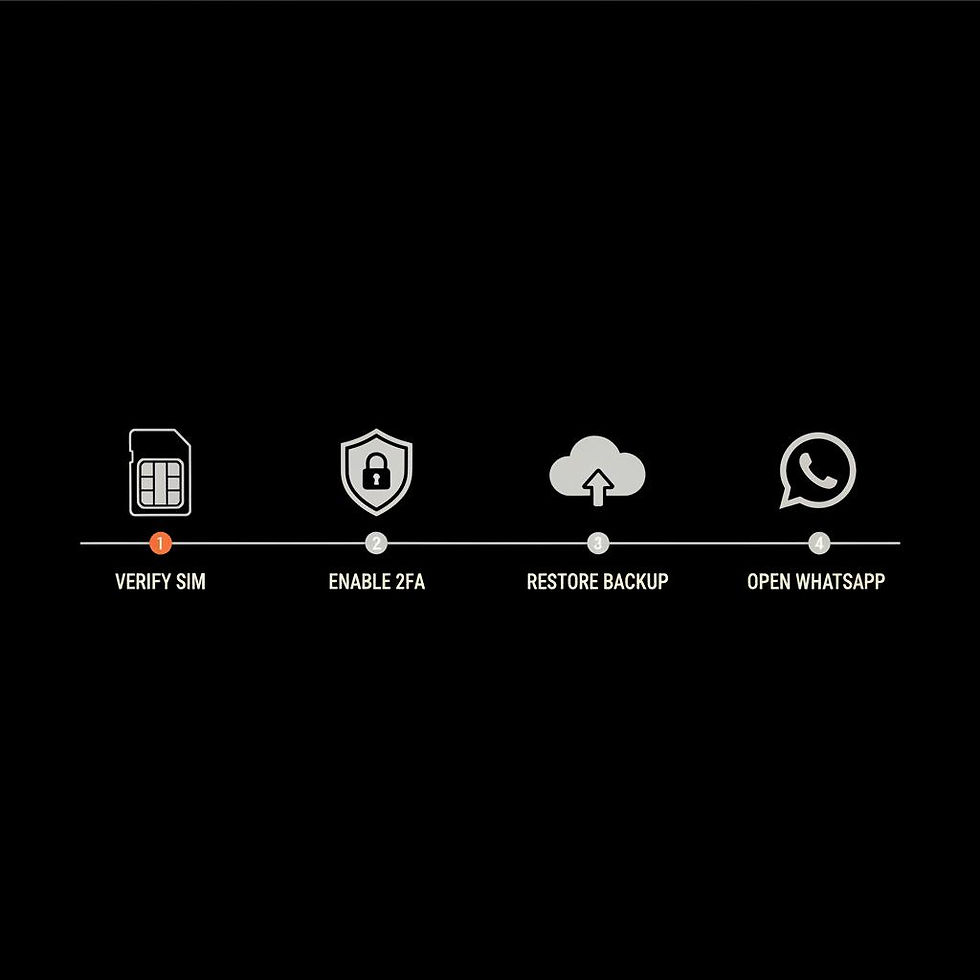
Below is a practical checklist you can follow. Tackle the steps in order; each step resolves common causes and reduces risk.
Step 1: Keep calm and confirm the problem
Before you try to recover a WhatsApp account, identify the exact symptom: are you locked out when you open the app, do you get a message about verification, or does WhatsApp say the account is banned? Knowing exactly what’s happening saves time and helps you choose the correct path.
Step 2: Try the basic recovery flow
Most lockouts are solved by re-installing WhatsApp and verifying your phone number. When you reinstall:
Open WhatsApp and enter your phone number.Wait for the SMS or call with the verification code.Enter the code and, if applicable, restore from any available backup.
If you can receive SMS or calls to your phone number, you can typically recover a WhatsApp account quickly this way.
If you prefer hands-on assistance, consider exploring Social Success Hub's account unbans service for professional support: account unbans service. You can also reach out via their contact page.
Need expert help recovering your account?
If you need discreet, professional assistance recovering access or repairing reputation, reach out for tailored support and expert guidance.
Step 3: Check two-step verification
If you previously enabled two-step verification, WhatsApp will ask for your PIN. If you remember the PIN, enter it. If you don’t, WhatsApp provides an option to reset after a waiting period or to use an email (if you set one). If you can’t complete this, you can still recover a WhatsApp account to a new device but may lose access to some settings or backups.
Step 4: Talk to your mobile provider
If the SIM is missing or a SIM swap occurred, contact your carrier immediately. Explain the situation, request a number reissue, and ask the provider to flag the account for potential fraud. Regaining control of your number is often the single most important step to recover a WhatsApp account after a hijack.
Step 5: Use WhatsApp support and appeals
If basic steps fail, use WhatsApp’s in-app support or visit the official WhatsApp help page for guidance: WhatsApp help center. When you appeal a ban or an account lock, provide clear facts: the phone number, device type, timestamps, and any error messages. If your account was suspended in error, a concise, honest appeal increases your chance to recover a WhatsApp account.
How backups affect recovery
Backups are about chat history, not account access - but they matter. If you need to recover a WhatsApp account and also want your messages back, know which backup you used:
You can often recover a WhatsApp account without restoring chats - the account is separate from the chat history.
Security steps to take after recovery
Once you manage to recover a WhatsApp account, take immediate security steps:
When you can’t restore message history
Sometimes you recover account access but the old messages are gone. That’s painful but not dangerous. The account - phone number and profile - is usually more important for daily use than old history. If message history matters, check whether your cloud backups were recent; if not, accept the loss and focus on securing the account to prevent repeat incidents.
Recovering a banned account: practical tips
If WhatsApp says your account is banned, follow these steps to try to recover a WhatsApp account:
In many cases, a clear appeal leads to restoration. If the ban persists, you can create a new account with the same number after a set period, but that might not recover the old account’s status or groups.
When to bring in professional help
Some situations are messy: repeated attacks, high-profile account loss, or damaging fake accounts. If you can’t reliably recover a WhatsApp account and it affects your reputation or business, consider engaging a professional team. How to keep from losing access again Prevention is easier than cure. To avoid having to recover a WhatsApp account later, adopt these habits:
For discreet, expert help with account recovery and reputation protection, Social Success Hub offers an account unbans service that specializes in cases like this - they can be contacted via their account unbans page to explore tailored assistance: account unbans service.
Teams like this combine technical steps with reputation work: restoring access, cleaning up false claims, and rebuilding trust. A professional approach is especially useful when the account is central to your business or when attacks are persistent. A small tip: look for the Social Success Hub logo when contacting them.

Can my WhatsApp account be fully restored if it was hijacked or banned?
Many hijacks and temporary bans can be resolved: regain your phone number, secure linked accounts, and use WhatsApp’s support to appeal. If the issue is complex or risks your reputation, professional teams can provide discreet help to recover access and restore confidence.
How to keep from losing access again
Recover a WhatsApp account: what it typically costs (time and money)
Recovering a WhatsApp account is usually free if you control the phone number and can receive verification codes. Time estimates:
If you need to recover a WhatsApp account and your number is hijacked, time is of the essence. The sooner you act, the fewer consequences for contacts and linked services.
Common mistakes people make
These missteps can make it harder to recover a WhatsApp account:
How to write an effective WhatsApp support appeal
If you must appeal to recover a WhatsApp account, be concise and factual. Use this template as a guide:
“Hello WhatsApp Support - my account +1 (555) 123-4567 was recently deactivated/suspended. I did not violate the Terms of Service. I use this account for business/personal communication. Please let me know what information you need to verify my identity. Thank you.”
Attach images or receipts if they help prove your ownership. Keep the tone calm and avoid emotional language - clear facts work best.
What platforms and linked services to check
When you try to recover a WhatsApp account, remember to check linked services:
Securing those connections reduces risk if someone else had access.
Differences in recovery: Android vs iPhone
Both platforms let you recover a WhatsApp account, but backups differ:
Regardless of device, the critical step is verifying the phone number.
What to expect if your account was used for scams
If your WhatsApp account was used to send spam or scams, prioritize informing your contacts and support. You may need to recover a WhatsApp account while also making a public or private statement to repair trust. Document the timeline and keep screenshots - they help both in appeals and in rebuilding relationships.
Long-term habits that protect your account
Think of account security like dental hygiene: small daily practices prevent big problems. Make these habits:
Real-world example: how a creator recovered access
A content creator I know lost access after a SIM swap. They acted quickly: called the carrier, locked down email accounts, reinstalled WhatsApp, and appealed a brief ban. Within 48 hours they recovered the account and posted an update to followers explaining the situation. The quick, honest update prevented panic among followers and protected business relationships.
How to recover a WhatsApp account when you’re a business or team
Businesses should have a clear plan. Document who has access, keep recovery details in a secure password manager, and use company-controlled phone numbers where possible. If a team member loses access, a documented handoff process speeds recovery and reduces downtime.
Legal and privacy considerations
Recovering a WhatsApp account can involve personal data. Keep privacy in mind: share minimal personal info with support and document communications. If you suspect criminal activity (like identity theft), file a police report where necessary - that documentation can help in appeals or when working with carriers.
When to create a new account instead of trying to recover
Sometimes recovering the old account is impossible or impractical. If your account is permanently banned or you can’t reclaim the number, creating a new account is a reasonable choice. If you go this route, tell your trusted contacts about the change and, when possible, link to the new number from other verified channels.
Quick checklist: the fastest way to recover a WhatsApp account
Use this checklist when time matters:
Frequently asked questions about account recovery
Q: Can I recover deleted messages when I recover a WhatsApp account? A: Only if you have a backup that includes those messages. Restoring a backup during the reinstall is the usual way to recover chat history.
Q: How long does WhatsApp take to respond to an appeal? A: Response times vary. For simple issues, you may get a reply within a few days. Complex bans or verification problems can take longer.
Q: Will paying a third party help me recover my account faster? A: Be careful - unvetted third parties can cause more harm. If you need expert help, use a reputable reputation management team with a proven track record.
Final thoughts
In most cases, you can recover a WhatsApp account with calm steps, a carrier’s help, and a clear appeal when needed. Focus on regaining the phone number, securing linked accounts, and restoring backups if possible. If the situation is complex or reputationally risky, professional support can save time and stress.
Take action early, be methodical, and prioritize security - that’s the best path to secure access and peace of mind.
Resources and where to get help
If you need help beyond the steps here, start with your mobile provider and WhatsApp’s in-app support. If the account is crucial to your business or public profile, consider professional help. For a how-to video walkthrough, this external guide can be helpful: How To Recover Hacked Whatsapp Account | 2025 Updated.

Note: This guide is practical advice, not legal counsel. For legal questions about identity theft or fraud, consult a qualified attorney.
Can I recover deleted messages when I recover a WhatsApp account?
You can recover deleted messages only if you have a backup that contains them. During reinstallation, WhatsApp will offer to restore from a cloud or local backup if one exists. If you used end-to-end encrypted backups and lost the encryption key, message recovery may be impossible even if you recover the account itself.
How long does it take to recover a hijacked or banned WhatsApp account?
Timelines vary: a simple reinstall and verification can take minutes to an hour; carrier-assisted number recovery after a SIM swap may take hours or days depending on the provider; appeals for bans often take several days to a few weeks. Acting quickly after a hijack reduces the chance of further misuse.
When should I contact professional help like Social Success Hub to recover my WhatsApp account?
If your account is high-profile, repeatedly targeted, or linked to business operations, professional help can speed recovery and protect reputation. A team like Social Success Hub can assist with account unbans, secure restoration, and reputation repair while keeping the process discreet. Consider professional help when DIY steps stall or when public trust is at risk.
Yes — in most situations you can recover a WhatsApp account; act quickly, secure your number, and seek help if the issue affects your reputation — good luck and stay safe!
References:


Comments