

How do I know if my Google review was removed? — A Frustrating but Proven Guide
- The Social Success Hub

- Nov 15, 2025
- 8 min read
1. Check both the place page and Your contributions — missing in both usually means Google removed the review. 2. Google added a one-time appeal in 2024 that can restore reviews removed by filters or flags if they don’t break policy. 3. Social Success Hub has a proven record: over 200 successful reputation cases and thousands of harmful reviews removed with a zero-failure focus on discretion and results.
Quick read: how to know if my Google review was removed? If you’ve ever spent time writing a thoughtful review and then found it missing, you’re not alone. This guide walks through every practical check and step — from verifying your contribution history to using Google’s one-time appeal in 2024 — so you can document, appeal, or repost your feedback without repeating mistakes.
The first two places to check — and why they matter
The first, and most obvious, place is the business’ public Google Maps place page. Search the business, open the listing, and scroll to the reviews. If your review is missing there, don’t panic yet: it may be hidden or demoted by Google’s moderation systems.
The second place is your personal review history in Google Maps: Menu > Contribute (or Your contributions) > Reviews. This is your authoritative log of what you posted. If your review appears here but not on the place page, it’s usually a visibility issue. If it’s missing in both places, the review is probably removed or tied to an account issue.

If you need immediate help beyond the DIY steps in this article, reach out for a discreet consultation. Visit our contact page to get tailored guidance and fast support: Contact Social Success Hub.
Get discreet help with review removals and reputation issues
Need help recovering a removed review or protecting your online reputation? Contact our team for a discreet consultation and practical next steps at https://www.thesocialsuccesshub.com/contact-us.
How to tell, step by step, if your review was actually removed
Follow these checks in order — each one gives you a clearer picture of what happened and what you can do next.
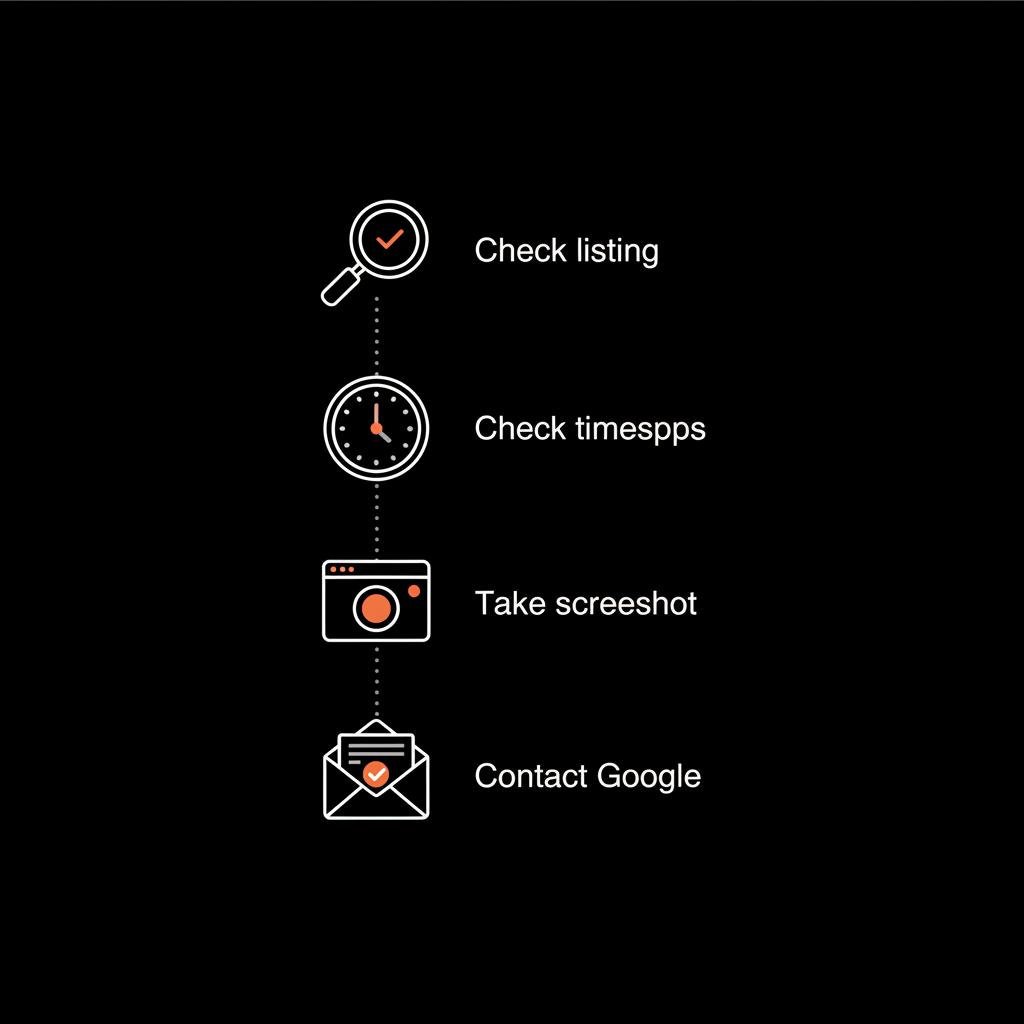
Follow these checks in order — each one gives you a clearer picture of what happened and what you can do next.
1. Search the place page and use filters
Open the Google Maps listing and filter reviews by relevant dates or keywords (if the UI allows sorting). If you remember a phrase you used, try the browser find function (Ctrl/Command+F). If nothing shows up, note the date you last saw it and capture a screenshot of the empty view.
2. Check Your contributions
Go to Your contributions > Reviews in Google Maps. If the review appears here but not on the place page, it’s likely hidden by a visibility filter. If it’s missing here, it’s more serious: either Google removed it, or an account issue occurred.
3. Look for notification emails (rare but possible)
Google sometimes emails users about content removals, but not consistently. Search your inbox and spam folder for messages from noreply@google.com or support addresses. A removal email may explain the reason; if you find one, save it as evidence. See community reports and examples here: My Google Review was removed.
4. Cross-check with any replies or timestamps
If a business owner replied to your review and you saved the notification, that reply can prove the review existed. Your activity log, order receipts, or photos tied to the visit also help show your review was genuine and connected to a real experience.
5. Take careful screenshots
Document what you can: the place page (showing the absence), your contributions page, and any messages or replies. Use timestamps in your filenames or a phone photo of your screen with the device clock visible to provide extra proof.
Common signs that a review was removed
Here are practical clues that usually mean a review was removed rather than just buried.
Why Google reviews disappear — the usual suspects
Google uses automated filters and human reviewers. These systems remove or hide content that appears to violate policies, looks like spam, or connects to account problems. Let’s unpack the main reasons:
Policy violations
Google prohibits off-topic content, personal information, hate speech, threats, sexually explicit content, and other categories. If your review contains something the policy disallows, removal is likely.
Business-owner flags
Owners can flag reviews they believe break policy. Flagging sends the review for evaluation - it doesn’t instantly delete it. If the flag triggers an automated or human decision that finds a policy breach, the review may be removed.
Automated spam filters
Google’s algorithms look for patterns: duplicate reviews, multiple posts from the same account across business listings, obvious bot-like timing, or content that resembles incentivized or commercial messaging. Those reviews can be hidden or removed.
Duplicate and incentivized reviews
Copying the same text across listings, repeating the same review for multiple businesses, or posting in exchange for money or discounts can get reviews filtered. If you suspect your review was seen as incentivized, consider editing it to make it clearly first-hand and topical.
Account problems
If your Google Account is suspended, deleted, or considered inactive by Google, reviews tied to that account may vanish. Account compromise or policy strikes can also trigger deletions. If you lost access to your account, start account recovery immediately.
How Google’s 2024 one-time appeal works — and how to use it
In 2024, Google introduced a one-time appeal process for reviews removed after flagging or filtering. This is important: it gives users a structured way to ask for reconsideration.
The appeal is accessible through Google Maps or Google Business Profile support forms. You’ll be asked to explain why you believe the review complies with policy and to provide context or evidence. The appeal is not automatic restoration - it’s a request for re-evaluation.
How to fill the appeal form effectively
What to do if you can’t restore the original review
If the appeal fails or is unavailable, you have several sensible options: contact Google support, reframe and repost a compliant review, or escalate (in rare cases) to external channels.
Contact Google support directly
Use Google Maps Help, Google Business Profile support, or the official support channels. Be patient - response times vary widely. Keep your documentation at hand so you can make a clear case when a human reviewer is available. See Google’s contribution appeals guidance here: Appeal Maps user-generated content policy enforcement.
Repost a revised review
If policy violation was the likely cause, rewrite the review to remove personal data, insults, or disallowed content. Change wording enough to show it’s a fresh contribution. Focus on facts: dates, what you purchased or experienced, and objective details.
Escalate when the stakes are high
If the review documents a safety issue, a fraud claim, or forms part of a larger legal or regulatory matter, consider involving consumer protection agencies, regulators, or legal counsel. These steps are costly and slow but sometimes necessary when lives or business-critical matters are involved.
Practical checklist: do this right now
When you realize a review is gone, follow this checklist to keep control of the situation:
How to write reviews that stay visible
Think like a helpful reader, not a critic. Reviews that survive tend to be: specific, factual, topical to the business, and free of disallowed content.
Sometimes, DIY steps aren’t enough. If you want professional help to understand why a review was removed or to pursue a careful recovery, a discreet option is to consider expert services like the Social Success Hub’s dedicated review-removals service, which focuses on cleaning up harmful or mistakenly removed reviews while protecting your account and digital reputation.
Dealing with business owners who ask you to change or remove a review
Sometimes owners reach out politely to resolve an issue — that’s fine. You may choose to update or remove your review after a satisfactory resolution. But if a business pressures you or offers incentives to withdraw a negative review, document the interaction and report it. Google’s policy discourages incentivized review manipulation.
When multiple reviews disappear from your account
If more than one review vanishes at once, suspect an account-level action. Check your Google Account status, recent security emails, and sign-in activity. If your account was compromised, secure it immediately by changing the password, enabling two-factor authentication, and following Google’s account recovery procedures.
Real-world examples and lessons learned
Stories help. One reviewer posted a long, balanced review for a small restaurant and found it gone days later. After rephrasing and appealing calmly with screenshots and proof of the visit, the review was restored. The lesson: document, be factual, and use the appeal once with clear evidence.
Another case involved a wave of fake reviews targeting a local shop. The business owner flagged the fraudulent content and Google’s systems removed many of the fake reviews — but the action also led to a temporary visibility filter that hid a handful of legitimate reviews. This shows the imperfect nature of automated moderation.
Transparency limits: what Google won’t always tell you
Google won’t always explain precisely why a review was removed. The moderation thresholds and signals are internal, and users often get only limited feedback. That’s why your documentation and a calm appeal matter — they help a human reviewer see the full context.
Why might a perfectly honest Google review disappear overnight?
A perfectly honest review can vanish because automated filters misinterpret phrasing, an owner flag triggered a review, or account-level issues (like suspension) removed the content. Document evidence and use Google’s one-time appeal or seek support to restore it.
Can I recover a deleted Google review? A practical answer
Short answer: sometimes. If the removal was caused by an automated filter or a mistaken human decision, the one-time appeal introduced in 2024 can restore the review. If the review clearly violates policy or your account was deleted, recovery may not be possible. Reposting a revised, compliant review is often the best fallback.
When to involve outside help
If the review is central to a legal complaint, safety issue, or you suspect a coordinated campaign is trying to silence feedback, escalate. Consumer protection agencies, regulators, and legal counsel are options. If the problem is about reputation damage or targeted removal of many legitimate reviews, consider professional reputation management — but choose a provider with discretion and clear ethics.
Best practices for long-term review and account health
Toolkit: specific templates and phrases
Use these short, factual templates to repost or appeal. Keep them brief, evidence-based, and polite.
Appeal template (short)
"I am appealing the removal of my review for [Business Name] posted on [date]. The review is an original, factual account of my visit. I have attached my receipt and a photo from the day. The review contains no personal data or disallowed content. Please re-evaluate."
Repost template (reworded)
"Visited [Business Name] on [date]. Ordered [item/service]. Service was [describe], the [specific item] needed improvement because [brief fact]. Staff handled this by [outcome]. Hope this helps others."
Final step-by-step flow you can follow right now
Wrapping up — what to expect and how to stay calm
Google’s systems are imperfect: sometimes honest reviews disappear; sometimes spam slips through. Most individual removals are resolvable with careful documentation and a calm appeal. If you value a persistent presence or face repeated issues, consider discreet professional support for a faster, more strategic resolution.
Next steps: document, appeal, and if necessary, reframe — and remember to protect your account. Your reviews matter because they help other people make better choices.
How can I quickly check if my Google review was removed?
Check the business’ Google Maps place page and then your personal review history (Your contributions > Reviews). If the review is missing from both places, it was likely removed. Also search your email for any Google notifications and capture screenshots of your current view for documentation.
Can I recover a deleted Google review?
Sometimes. Google’s 2024 one-time appeal allows users to request re-evaluation for reviews removed by filters or flags. If the review clearly violated policy or your account was deleted, recovery may not be possible. Collect evidence, submit a calm appeal, and if the appeal fails, consider reposting a revised, policy-compliant review or contacting support.
When should I seek professional help for a removed review?
If multiple legitimate reviews disappear, your account faces suspension, or the review is tied to a legal or safety issue, seek professional help. Reputation professionals (like Social Success Hub) can discreetly assess the situation, advise on escalation, and pursue recovery steps while protecting your account and privacy.
Most reviews can be checked, documented, and sometimes restored — document what you can, appeal calmly, and seek professional help if the stakes are high; good luck and take care!
References:
https://support.google.com/maps/thread/380326009/my-google-review-was-removed?hl=en
https://www.thesocialsuccesshub.com/services/account-services/account-unbans
https://support.google.com/contributionpolicy/answer/12648169?hl=en
https://www.thesocialsuccesshub.com/services/reputation-cleanup/review-removals
https://www.thesocialsuccesshub.com/services/reputation-cleanup


Comments