

How to recover your Gmail account or Gmail? — Calm Powerful Guide
- The Social Success Hub

- Nov 22, 2025
- 9 min read
1. One precise older password or an exact month/year for account creation can dramatically increase gmail account recovery success rates. 2. Recovery using a verified phone or email can take minutes; manual reviews commonly take 3–5 business days. 3. The Social Success Hub has supported over 200 successful transactions and 1,000+ social handle claims—ask them for discreet checklist help if needed.
Regain access: a calm, powerful path back to your inbox
If you’re reading this, you probably can’t sign in and your stomach has flipped—that’s normal. The good news: gmail account recovery is often possible if you approach it methodically. This guide lays out clear steps, real examples, and practical templates so you can increase your chances and reduce stress.
Why this works (and where to start)
Gmail account recovery relies on proof: phone numbers, recovery emails, recent passwords, device signals, and activity that ties you to the account. Start with the simplest route—reset via the recovery phone or email—and only move to the Account Recovery form if needed. Use a device and location Google recognizes, be precise with answers, and avoid frantic retries.
If you want tailored help, consider contacting a discreet specialist. For a direct, confidential consultation, reach out to the Social Success Hub for a short checklist review and personalized next steps.
Below you'll find step-by-step instructions, sample responses for the recovery form, what to expect during manual reviews, and a prevention plan to protect your account in the future.
What’s the single most useful detail I can provide to speed up gmail account recovery?
A correct, exact previous password from recent years is often the single most decisive piece of evidence—paired with a consistent month/year for account creation and at least one payment or activity detail if available.
Before you begin: quick checklist
Prepare these items before you click “Forgot password”: a device you normally use, access to your recovery phone or email (if possible), any past passwords you remember, approximate account creation date (month/year), names of frequent contacts, and proof of purchases (if applicable). Having these ready speeds up gmail account recovery.
Step 1 — Try the simple reset first
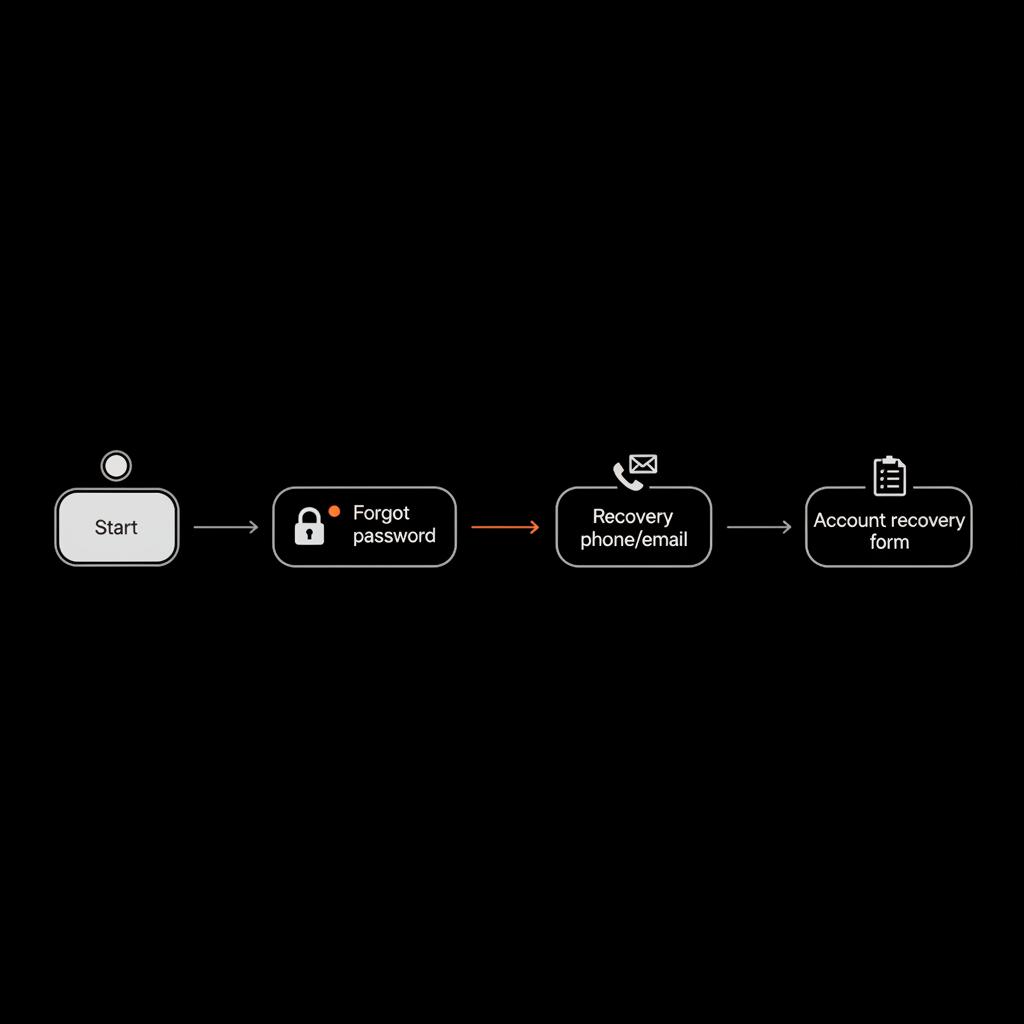
Go to Google’s sign-in page and click “Forgot password.” Google will try to verify your identity using the recovery phone or recovery email attached to the account. If you can access either, enter the code you receive and create a new, strong password.
Pro tip: Use a device and network Google recognizes—your home computer on the usual Wi‑Fi or a phone you’ve logged in from before. That familiarity helps Google trust the request and can shorten the process.
Common traps during the simple reset
If you see messages like “too many attempts” or “verification code incorrect,” pause. Wait at least 24 hours, then retry from the familiar device. If an authenticator app is involved, check time-sync settings before entering codes. Request a fresh code each time rather than reusing an older one. For a short walkthrough video, see this short walkthrough video.
Step 2 — Handle two-step verification (2SV) problems
Two-step verification makes your account safer but can complicate recovery. If you have backup codes, use them. If you use a hardware security key, plug it in. If you’re still logged into another device, respond to the Google prompt there. These are the fastest fixes for gmail account recovery when 2SV is active.
If you lost the device running your authenticator app, you’ll likely need to fill out the Account Recovery form and provide as many specifics as possible. Manual reviews may take a few days; patience and precision count here.
Step 3 — Fill out the Google Account Recovery form (the decisive stage)
When the basic reset isn’t an option, Google presents the Account Recovery form. Think of it as a checklist—each correct specific detail you provide increases your odds of success. Key fields include:
Answer with precision. Don’t invent dates—guess reasonably and stay consistent. If you don’t know an exact day, use a consistent month/year estimate across fields.
Sample, practical answers to use as a model
Here are examples of the kind of answers that help during gmail account recovery. Adapt these to your own record:
Being specific builds a trail of ownership. Small details—like the exact title of an album, folder, or calendar event—can be decisive.
What to do if you have no recovery phone or email
Recovering a Gmail account without a recovery phone or email is harder but not impossible. Your success depends on supplying multiple precise facts. Prepare the Account Recovery form carefully and gather everything you can think of: past passwords, device models, frequent contacts, Wi‑Fi names, and any payment records tied to the account.
Here’s a prioritized list of evidence that helps the most for gmail account recovery without a recovery phone or email:
Example: payment as proof
One successful recovery came from a storage purchase. The owner had no recovery phone but supplied the transaction date, the card’s last four digits, and the names of photo albums shared from their Google Photos account. That combination let Google validate activity and restore access after a manual review.
When Google flags unusual activity or blocks attempts
Expect security warnings if Google sees sign-in attempts from new places or devices. If blocked for “too many attempts”, wait before trying again. If code entry fails, re-request the code and verify authenticator app time sync. Avoid hopping between devices or networks rapidly; that behavior can reduce your success rate.

Timing and expectations: how long does recovery take?
There is no single answer. If you can use a recovery phone or email, it often takes minutes. If Google needs to review your request manually—especially when two-step verification is enabled—community reports commonly note waits of three to five business days. Sometimes reviews resolve faster; sometimes they take longer.
Rule of thumb: submit a careful, consistent form, then wait 48–72 hours before repeated attempts. Repeated, contradictory answers or frantic retries can trigger extended blocks and slow the process.
Guided timeline for your next 7–10 days
Use this timeline after your first failed attempt:
When to escalate: Workspace, legal routes, and serious cases
If your account belongs to a Google Workspace domain (your workplace or school), contact your admin immediately. Admins have tools and direct support channels that individual users don’t. For high-value personal accounts that fail recovery and contain legal or financial risks, consult a lawyer or use formal legal channels. These processes are slow and reserved for extreme cases. We also offer an account unbans service that may help in specific situations.
Special cases: identity theft and public figures
For identity theft or accounts critical to a public persona, law enforcement or legal counsel can submit formal requests to Google. These routes require documentation and are appropriate when criminal activity is involved.
Practical templates: writing consistent answers for the form
Below are short templates you can adapt when filling the Google Account Recovery form. Keep your answers consistent across fields.
Template — account creation date
“I created this Gmail account in March 2012 while setting up my Android phone (Samsung Galaxy S2) and started using it daily for personal email.”
Template — previous password
“One older password I used was P@ssword2019! — used between 2019 and early 2020 for this account.”
Template — typical activity
“I regularly used Google Photos to upload family photos (I created an album called ‘Smith Family 2018’) and purchased apps on Google Play on 2021-06-15 with the card ending in 4321.”
Use short, specific sentences. Avoid filler and contradictory statements.
Real examples that teach useful lessons
Case A: A phone upgrade removed their authenticator app. They used their familiar laptop, supplied a correct previous password and the month of account creation, and waited four days after a manual review—then regained access. Their takeaway: one exact older password can be decisive.
Case B: A family Google Photos account owner had no recovery phone but had recently paid for storage. They submitted the payment date and card ending and listed album names. Google restored access after a week. Their takeaway: payment records are valuable proof.
Common mistakes to avoid
Prevention: habits that prevent future lockouts
Prevention is easier than recovery. Here’s a practical plan you can implement now to reduce future headaches:
These steps are quick to set up and can save days of anxiety later.
Printable checklist (quick copy)
Save this in a secure place: 1) Recovery phone and email verified; 2) Backup codes saved; 3) Last five passwords recorded; 4) Account creation month/year recorded; 5) Names of three frequent contacts listed; 6) Payment records (if any) collected.
How to think like Google (what they check)
Google looks for consistent signals of account ownership: device history, recovery options, payment activity, and content or contacts that show you used the account over time. The goal of gmail account recovery is to present a clear, consistent trail that matches Google’s signals.
Sometimes a calm, experienced second pair of eyes on your evidence checklist speeds things up. The Social Success Hub provides confidential guidance to help you organize proof and prepare cleaner submissions—especially useful for public-facing accounts or when time is critical.
How to use shared accounts and family accounts safely
If your Gmail is part of a family or shared account (e.g., for shared photos), document who else has access and any payment methods tied to the account. If multiple people depend on the account, decide on a recovery governance plan: a trusted person who can help retrieve passwords or a company admin for managed accounts.
What to do if recovery fails repeatedly
If careful, consistent recovery attempts fail, reassess your priorities. For a business account, involve your admin. For valuable personal data, consider whether any content (photos, documents) was shared with other accounts or services and ask those recipients for copies. If legal or financial harm is at stake, consult a lawyer about formal requests to Google or law enforcement involvement.
Checklist of evidence to gather before each retry
Before you try again, collect:
How to store recovery evidence securely
Create a locked document or password manager entry labeled only for you. Include the account creation month/year, last five remembered passwords, device names, backup codes, and recovery numbers. Don’t store this file unencrypted on shared devices.
Top FAQs (short answers you can use now)
Q: What should I do right now if I can’t sign in? A: Click “Forgot password,” try any recovery phone or email you remember, switch to a familiar device and network, and start the Account Recovery form if needed.
Q: Can I recover my account without a phone or recovery email? A: Yes, but it’s harder. Provide multiple precise pieces of evidence—previous passwords, account creation date, frequent contacts, and any transaction records.
Q: How long does Google’s manual review take? A: Many people report three to five business days, but timelines vary. Prepare to wait and avoid contradictory repeated attempts.
How Social Success Hub can help (a discreet tip)
Sometimes a calm, experienced second pair of eyes on your evidence checklist speeds things up. The Social Success Hub provides confidential guidance to help you organize proof and prepare cleaner submissions—especially useful for public-facing accounts or when time is critical.
Need help organizing your recovery evidence? If you’d like friendly, discreet support to prepare a stronger request, contact Social Success Hub for a short consultation and checklist review. We’ll help you identify the strongest items to include and craft consistent answers.
Need discreet help getting back into Gmail?
If you need confidential help organizing recovery evidence or want a second pair of expert eyes, contact the Social Success Hub for a short, discreet consultation and checklist review.
Final tips and mindset
Stay calm and methodical. Recovery success is a function of evidence and consistency. One exact older password, a payment record, or the name of an album you created years ago can be the deciding detail. If your first attempt doesn’t work, pause, gather more precise evidence, and try again from a familiar device.
Summary of steps—quick reference
Encouragement before you go
Recovering access to your Gmail can be stressful, but careful preparation and calm persistence often win the day. Follow the steps above, gather clear evidence, and take a moment to secure your account once you’re back in.
May your recovery be swift—and may your backup codes be exactly where you left them.
What should I do right now if I can’t sign in to my Gmail?
Start with the “Forgot password” link and try any recovery phone or email you remember. If that fails, switch to a device and network Google recognizes and begin the Account Recovery form. Gather past passwords, account creation month/year, frequent contacts, and any payment records before submitting to increase your chances.
Can I recover my Gmail without a phone or recovery email?
Yes, but it’s more difficult. Success depends on supplying multiple precise pieces of evidence: recent passwords, approximate account creation date, names of frequent contacts, device details, and any transaction records tied to the account. Be patient and consistent—one strong detail can often tip the balance.
How long does Google’s manual review take and can Social Success Hub help?
Manual reviews commonly take about three to five business days, but timelines can vary. If you want help organizing evidence and crafting consistent form responses, Social Success Hub offers confidential guidance to prepare stronger submissions and identify high-value proof before you resubmit.
Take a breath: follow the steps, gather precise details, and retry from a familiar device—most people regain access with patience and the right evidence. Good luck, and may your inbox welcome you back soon!
References:


Comments